
Introduction to Clusters - Storm Streaming Server
Storm Streaming Server has been designed from the ground up with full scalability in mind, enabling it to handle tens of thousands of video streams, each of which can have thousands of simultaneous viewers. Thanks to the implementation of a cluster architecture, the system gains additional redundancy and resistance to serious network infrastructure failures.
Cluster building can begin with just one server instance - without the need to immediately invest in multiple physical machines or VPSs (Virtual Private Servers). As demand increases, adding subsequent Storm Streaming Server instances allows for gradually increasing the system's performance and reliability.
Instances and Applications
A key aspect of cluster operation in Storm Streaming Server is the distinction between a server instance and applications.
Server instance refers to a running copy of the program on a specific operating system. If you have two licenses, you can run two instances - for example, on different physical or virtual servers.
Application is an internal component operating within a single instance. The basic type of application is
mono- a universal application capable of receiving incoming streams, transcoding them, and delivering them to viewers. However, themonoapplication operates only within a single instance and cannot be scaled beyond its boundaries. This is where dedicated applications such asorigin,transcode,edge, and the brain of the entire system - ClusterManager - come into play. These enable scaling, redundancy, and flexibility across the entire cluster.
A single server instance can host multiple applications of different types with very different configurations. It is possible to configure a complete cluster on a single server machine, but also to split the system across multiple servers.
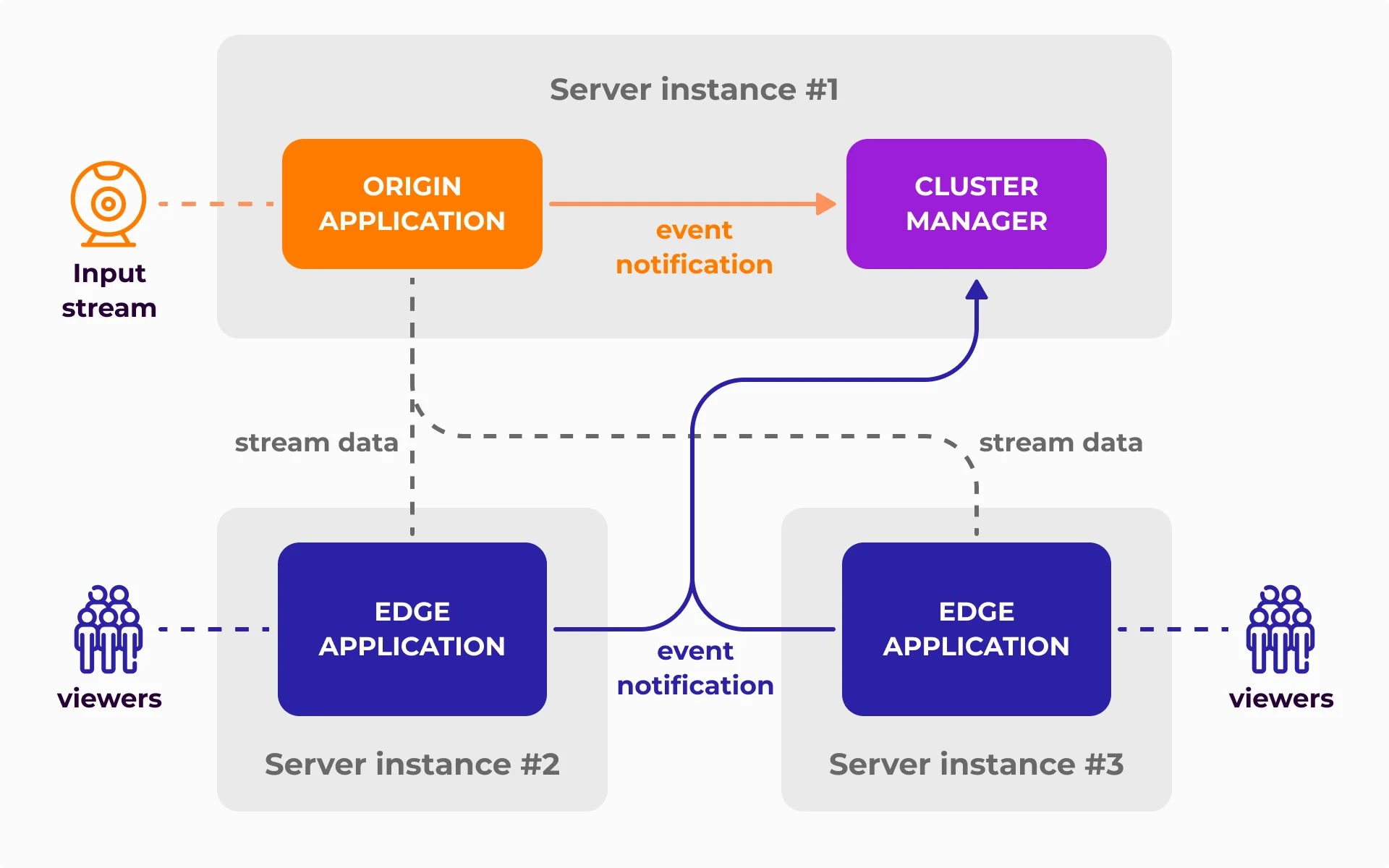
Cluster Building Blocks
Each cluster consists of the following types of applications:
ClusterManager is the most important component of the cluster - its "brain." Each of the remaining applications, immediately after startup, establishes a direct connection with the ClusterManager and through this connection sends or receives information about active streams. Each cluster requires at least one ClusterManager instance. For details on configuring this module, see the ClusterManager Settings guide.
Origin is an application responsible for accepting and authorizing incoming (ingest) streams. Origin continuously reports the status and data of all handled streams to the ClusterManager. Edge and transcode applications can connect to the Origin to copy or process active streams. For configuration details, see the Origin Application guide.
Transcode is an optional application in the cluster, whose role is to transcode streams into multiple quality levels. The scope of transcoding is controlled by the ClusterManager. Each transcode instance has a defined limit of simultaneous transcoding tasks - after reaching it, it does not accept subsequent tasks. For configuration details, see the Transcode Application guide.
Edge is an application responsible for copying streams from Origin or Transcode applications and redistributing them to viewers. It receives information about all stream changes from the ClusterManager and updates its sources accordingly. For configuration details, see the Edge Application guide.
Functional and Requirements Schema
| Origin | Transcode | Edge | |
|---|---|---|---|
| Can it accept streams from external software? | Yes | No | No |
| Can it transcode streams? | Yes | Yes | No |
| Can it record streams? | Yes | No | No |
| Required number of instances in a cluster | 1 | 0 | 1 |
Dynamic Allocation of Transcoding Resources
One of the key features of the Storm Streaming Server cluster is dynamic allocation of transcoding resources. Each transcode application has a defined maximum number of concurrent tasks (e.g., transcoding the original 1080p stream to 720p and 480p versions counts as two separate tasks).
Based on data provided by the ClusterManager, streams with the highest number of viewers - or those indicated by a defined weight system - are automatically directed for transcoding. Streams can be withdrawn from transcoding if other streams are deemed higher priority.
For details on configuring the weight system and transcoding allocation, see the ClusterManager Settings guide.
Management & Control Panel
A dedicated cluster module for the Control Panel is available at /cpanel#/cluster-manager-dashboard. This module provides an overview of all streams within the cluster, along with their statistics, status, and transcoding information. You can also view details about connected applications and server instance resource usage (CPU, memory, number of transcoded streams).
Ready to set up your cluster? Continue with the Cluster Configuration guide.
If you have any questions or need assistance, please create a support ticket and our team will help you.