
JWPlayer integration with Storm Streaming Cloud
JWPlayer is one of the oldest and most popular video players for websites. The vast number of plugins and configuration options makes it a great choice. Storm Streaming Server and Cloud can work together without any problems. To properly configure JWPlayer for work, it is necessary to select the HLS mode and define the link to the m3u8 file.
Embed code
The basic JW Player configuration looks as follow:
 html
html<div id="myElement"></div>
<script>
jwplayer("myElement").setup({
"playlist": [
{
"sources": [
{
"default": false,
"type": "hls",
"file": "https://${SERVER_HOST}/${APP_NAME}/${STREAM_KEY}.m3u8",
"label": "0",
"preload": "metadata"
}
]
}
],
"primary": "html5",
"hlshtml": true
});
</script>
Main parameters explanation
| Parameter | Description |
|---|---|
sources: type | This value must be set to "hls". |
sources: file | Path to m3u8 file related to the stream. See format below. |
URL Format:
https://${SERVER_HOST}/${APP_NAME}/${STREAM_KEY}.m3u8
Where:
| Variable | Description |
|---|---|
${SERVER_HOST} | Hostname for the Storm Cloud. Can be found on the Video Summary page. |
${APP_NAME} | Application name. For the Storm Cloud it's always "live". |
${STREAM_KEY} | Stream key for the video. For Storm Cloud, it can be found on the Video Summary page. |
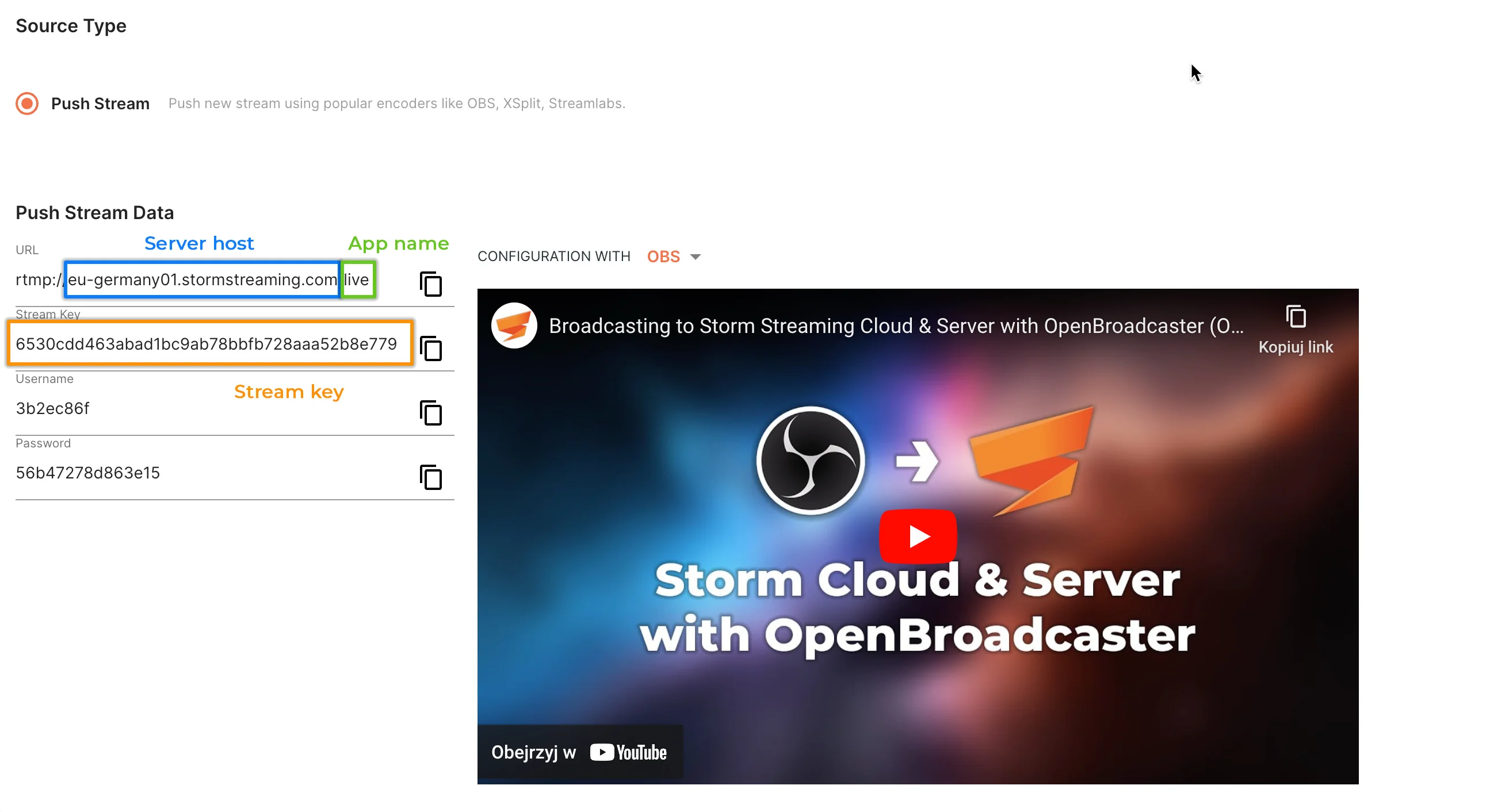
Example (Cloud Stream data):
| Field | Value |
|---|---|
| Cloud URL | rtmp://edge.stormstreaming.com/live |
| Stream Key | 6530cdd463abad1bc9ab78bbfb728aaa52b8e779 |
Turns into:
https://edge.stormstreaming.com/live/6530cdd463abad1bc9ab78bbfb728aaa52b8e779.m3u8
Adaptive Bitrate Streaming (ABR)
To use the Adaptive Bitrate Streaming (ABR) feature, it is necessary to activate and configure the transcoding option. In the case of Storm Streaming Cloud, this option can be selected when creating a stream (if the subscription allows it).
Differences Between JWPlayer & Storm Player Core/UI
JWPlayer and our dedicated Storm Player Core/UI behave differently. JWPlayer does not automatically react to stream state changes (e.g., published/unpublished). Developers are responsible for implementing custom logic if needed. JWPlayer will also not provide a server with real-time playback details.
Useful links
- JW Player Documentation - https://docs.jwplayer.com/platform/docs
Create a free ticket and our support team will provide you necessary assistance.